Chapter 9 PDX CellPlex
This dataset is low quality (Brown et al. 2024) and contains 4,327 cells derived from a human ovarian carcinosarcoma patient-derived xenograft (PDX). Nuclei from four donors were labelled using CellPlex oligos. The low quality is due to low input and uneven labelling of one hashtag. Overall, the dataset shows weak signals, and CMO301 exhibits stronger signals than the other hashtags due to over-labelling.
The subset of hash count data is shown below:
## 4 x 10 sparse Matrix of class "dgCMatrix"## [[ suppressing 10 column names 'AAACCCAAGCCATTGT-1', 'AAACCCACAAAGGGTC-1', 'AAACCCACACCTTCGT-1' ... ]]##
## CMO301 183 525 315 159 40 55 33 209 94 108
## CMO302 42 155 76 185 365 17 14 26 328 113
## CMO303 35 31 64 18 9 10 8 13 6 13
## CMO304 29 158 57 35 6 241 103 122 5 10The subset of gene expression data is shown below:
## 10 x 10 sparse Matrix of class "dgCMatrix"## [[ suppressing 10 column names 'AAACCCAAGCCATTGT-1', 'AAACCCACAAAGGGTC-1', 'AAACCCACACCTTCGT-1' ... ]]##
## AL627309.1 . . . . . . . . . .
## AL627309.5 . . . . . . . . . .
## AL627309.4 . . . . . . . . . .
## AC114498.1 . . . . . . . . . .
## AL669831.2 . . . . . . . . . .
## LINC01409 . . . . . . . . . .
## FAM87B . . . . . . . . . .
## LINC01128 . . . . . . . . . .
## LINC00115 . . . . . . . . . .
## AL645608.6 . . . . . . . . . .9.1 Local CLR normalization
The first step of CMDdemux is to normalize the hash count data using a local CLR normalization.
##        AAACCCAAGCCATTGT-1 AAACCCACAAAGGGTC-1 AAACCCACACCTTCGT-1 AAACCCACATCCGGTG-1 AAACCCAGTCCCAAAT-1 AAACCCAGTCGCGTTG-1
## CMO301          1.2247227         1.30285188          1.1721477          0.8679542          0.2473969          0.3247126
## CMO302         -0.2290129         0.08740668         -0.2397891          1.0185271          2.4364582         -0.8102674
## CMO303         -0.4066941        -1.49671343         -0.4092072         -1.2627806         -1.1635901         -1.3027438
## CMO304         -0.5890157         0.10645487         -0.5231515         -0.6237007         -1.5202650          1.7882986
##        AAACCCAGTCGCTCGA-1 AAACCCAGTGAGCCAA-1 AAACCCATCTCCGTGT-1 AAACCCATCTCGTTTA-1
## CMO301          0.2573540          1.3235610           1.031976          1.0752231
## CMO302         -0.5609563         -0.7277097           2.274157          1.1200737
## CMO303         -1.0717820         -1.3844892          -1.575991         -0.9770674
## CMO304          1.3753843          0.7886378          -1.730142         -1.2182295
The output of LocalCLRNorm is a normalized data matrix with rows representing hashtag samples and columns representing cells. Each entry is a normalized value.
9.2 K-medoids clustering
The local CLR-normalized values are used here for K-medoids clustering. Since this dataset has four samples, the default parameters are initially applied, which divide the cells into four clusters.
We use a boxplot to check whether the number of clusters is appropriate for clustering. An ideal result is that one box should be significantly higher than the other boxes in each panel.
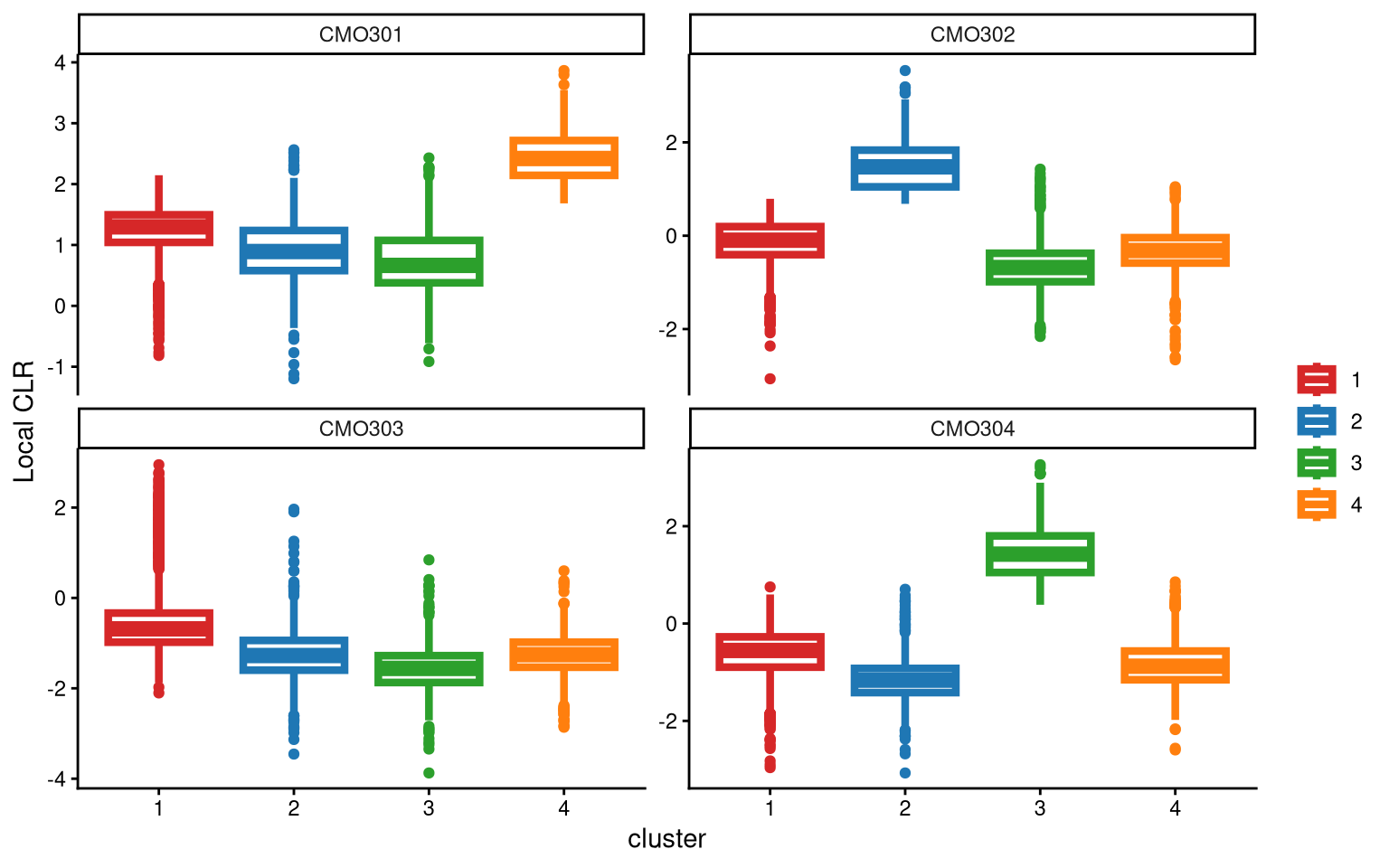
For CMO303, the four clusters show very similar local CLR values. Therefore, adding an additional cluster is considered. In the new round of clustering, the optional parameter is set to TRUE so that the optional workflow is performed to obtain more clusters, and we start by adding one extra cluster, which corresponds to the default value of extra_cluster.
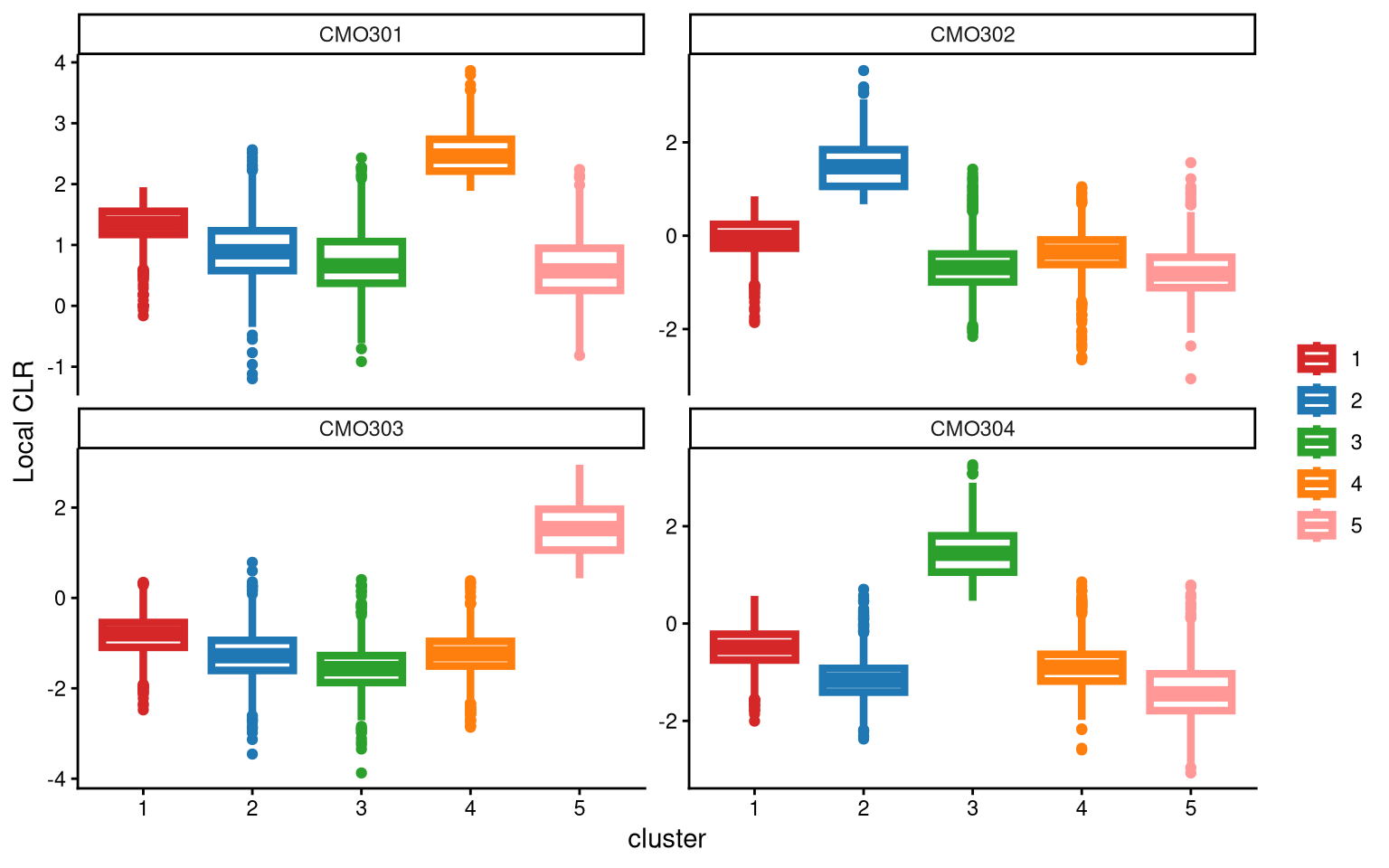
After adding one more cluster, it becomes clear that CMO303 is now highly and uniquely expressed in one cluster (cluster 5).
The ExamineClusterNumber function can then be used to double-check whether 5 clusters or 4 clusters is more appropriate for this dataset.
## [1] "The largest CLR difference is:CMO303 2.218. Choose optional clustering method (kmed.cl2 with5 clusters)."When adding one more cluster, CMO303 is highly expressed in Cluster 5 compared to the other clusters. For CMO303, when applying 4 clusters, the box with the largest median is Cluster 1, with a median of -0.68. When applying 5 clusters, Cluster 5 has the largest median, which is 1.53. The CLR difference between these two medians is 2.21, indicating that applying 5 clusters results in a higher median CLR value for one cluster of CMO303. Therefore, we should apply 5 clusters.
Next, the Euclidean distance between cells and their corresponding cluster centroid within each cluster is calculated using EuclideanClusterDist.
9.3 Definition of non-core cells
Core cells are defined as cells that are closer to their cluster centroids, while non-core cells are those that are farther away from the cluster centroid. The cut-off between core and non-core cells can be determined using EuclideanDistPlot, which visualizes the cut-off based on the quantile of the distribution via the eu_cut_q parameter, shown as the red line in the plot. Each value in the eu_cut_q parameter corresponds to a cut-off for a cluster.
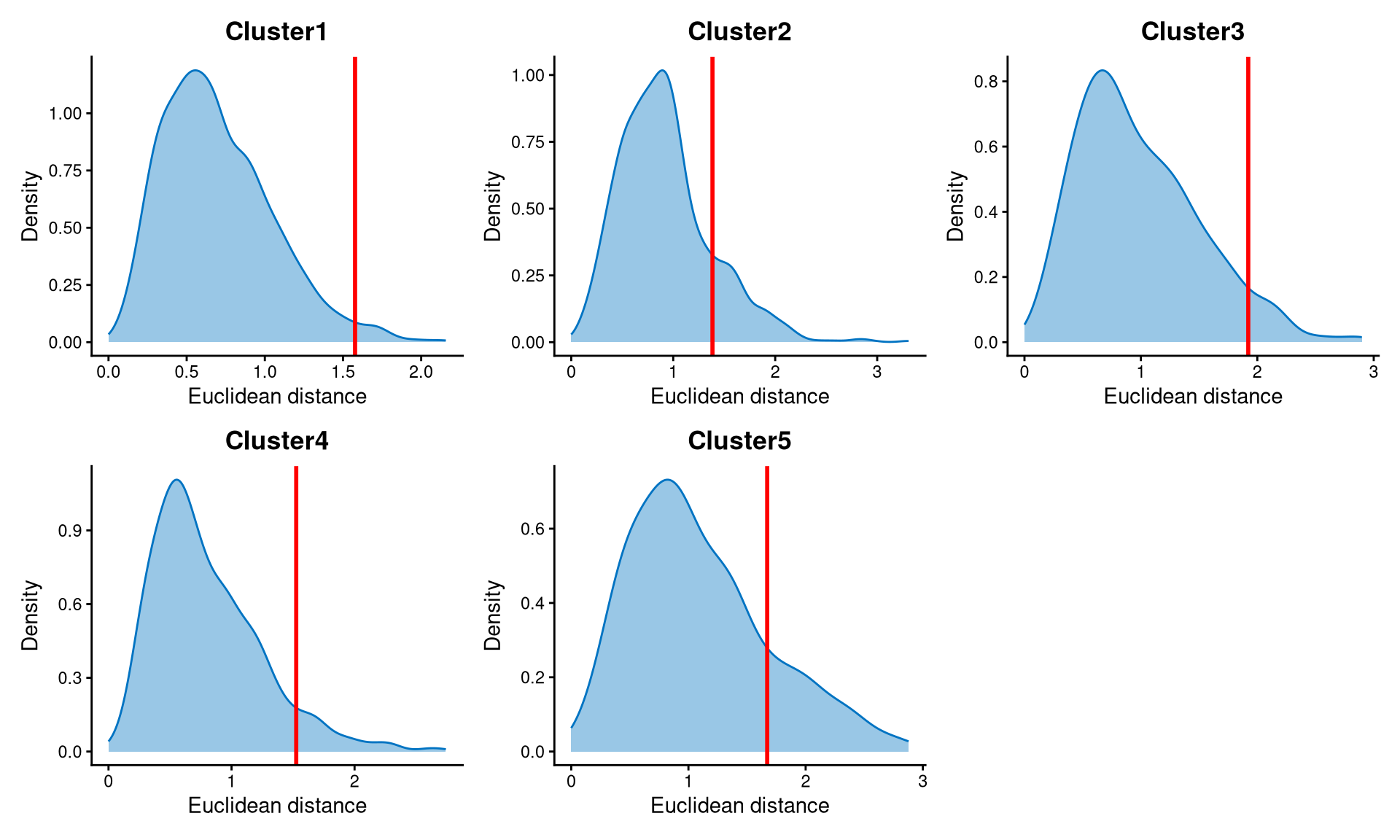
The Euclidean distance for each cluster is right-skewed, and the cut-offs are set at the tail of each distribution.
Core and non-core cells are then classified using DefineNonCore, with eu_cut_q determined from the above plots. Since an optional extra cluster was added during the k-medoids clustering step, the optional parameter should be set to TRUE, and clr.norm should be supplied from the output of LocalCLRNorm.
pdxcmo.noncore <- DefineNonCore(pdxcmo.cl.dist, pdxcmo.kmed.cl2, eu_cut_q = c(0.98, 0.85, 0.945, 0.93, 0.83), optional = TRUE, clr.norm = pdxcmo.clr.norm)
table(pdxcmo.noncore)
## pdxcmo.noncore
## Cluster2 Cluster3 Cluster4 Cluster5 non-core
## 824 519 920 201 1863Core cells are labelled by their clusters, and non-core cells are directly labelled as “non-core.”
The definition of core and non-core cells is further examined using CLRPlot.
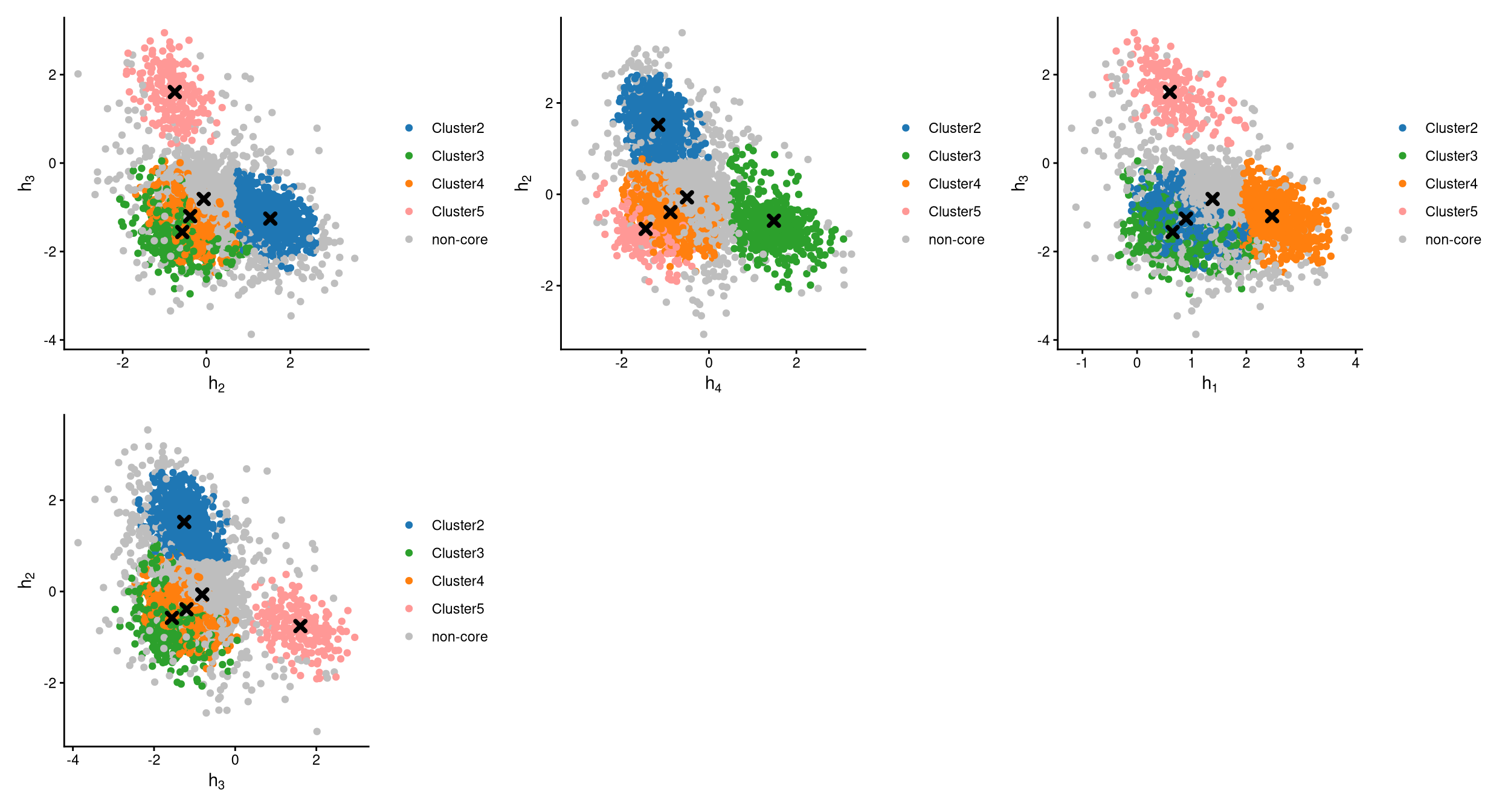
The pairwise local CLR-normalized values are shown in the above plots. Each plot clearly demonstrates two clusters, with other clusters appearing in the corners. Cluster centroids are indicated by cross symbols. All cells in cluster 1 are defined as non-core cells. Because one extra cluster was added during clustering, there should be exactly one cluster of cells defined as non-core. However, cluster 1 is not uniquely or highly expressing any hashtag in the CheckCLRBoxPlot for the version with 5 clusters.
9.4 Label clusters by sample
Each cluster will be labelled with its original sample, and here we use the alternative labelling method, “expression”. Each hashtag sample is assigned to the cluster has the maximum median local CLR value.
pdxcmo.cluster.assign <- LabelClusterHTO(pdxcmo.clr.norm, pdxcmo.kmed.cl2, pdxcmo.noncore, label_method = "expression")
pdxcmo.cluster.assign
## CMO301 CMO302 CMO303 CMO304
## 4 2 5 3The results show each sample and its corresponding cluster index. For example, cluster 2 corresponds to the CMO302 sample. Cluster 1 does not correspond to any sample, and its cells are non-core cells.
9.5 Computing the Mahalanobis distance
Using the local CLR-normalized values from LocalCLRNorm, the non-core cell classifications from DefineNonCore, the k-medoids clustering from KmedCluster, and the cluster labelling from LabelClusterHTO, the Mahalanobis distance for each single cell can be calculated using CalculateMD.
pdxcmo.md.mat <- CalculateMD(pdxcmo.clr.norm, pdxcmo.noncore, pdxcmo.kmed.cl2, pdxcmo.cluster.assign)
pdxcmo.md.mat[,1:10]
## AAACCCAAGCCATTGT-1 AAACCCACAAAGGGTC-1 AAACCCACACCTTCGT-1 AAACCCACATCCGGTG-1 AAACCCAGTCCCAAAT-1 AAACCCAGTCGCGTTG-1
## CMO301 3.054138 3.369435 3.174722 4.199033 6.975322 7.271179
## CMO302 3.988888 3.844809 4.033557 1.472757 2.248598 7.705463
## CMO303 4.661216 7.275932 4.686721 6.934954 8.326736 8.877749
## CMO304 5.094211 3.466230 4.944063 5.386276 8.470768 1.163671
## AAACCCAGTCGCTCGA-1 AAACCCAGTGAGCCAA-1 AAACCCATCTCCGTGT-1 AAACCCATCTCGTTTA-1
## CMO301 6.661956 4.339702 6.044375 4.008384
## CMO302 6.798755 5.894546 2.006296 1.026186
## CMO303 7.968939 7.610586 8.755856 6.430368
## CMO304 1.259780 2.081467 8.671003 6.655881The output is a Mahalanobis distance matrix with rows representing hashtag samples and columns representing cells. Each entry indicates the Mahalanobis distance of a cell to a given hashtag sample.
9.6 Detect outlier cells
Outlier cells, including negatives and doublets, are defined based on the distribution of the minimum Mahalanobis distance across all cells, which can be visualized using MDDensPlot. The cut-off in the plot is determined by the md_cut_q parameter, which specifies the quantile of the distribution and is shown as the red line. Users are encouraged to adjust the cut-off through the md_cut_q parameter.
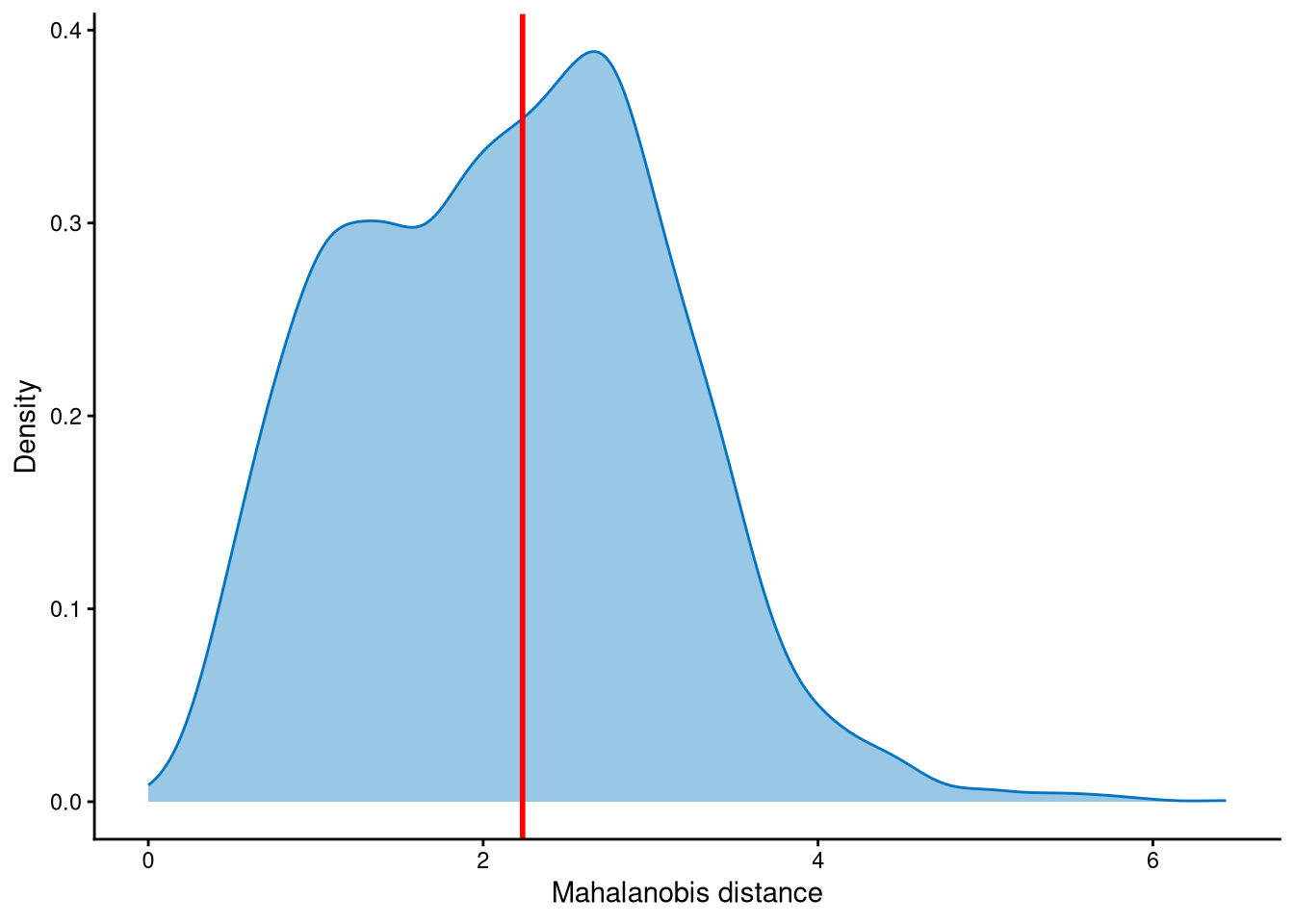
The Mahalanobis distance is trimodally distributed across cells. Setting the cut-off at the first anti-mode would be too conservative, as most cells would be classified as outliers. Therefore, the cut-off is set at the second anti-mode of the distribution, which is more appropriate. Cells with Mahalanobis distance larger than the cut-off are defined as outlier cells, and other cells are singlets.
Outlier cells are then defined using AssignOutlierDrop according to the cut-off selected from the plot.
pdxcmo.outlier.assign <- AssignOutlierDrop(pdxcmo.md.mat,  md_cut_q = 0.52)
table(pdxcmo.outlier.assign)
## pdxcmo.outlier.assign
## Outlier Singlet
## 2077 2250In this step, cells are labelled as either outliers or singlets.
9.7 Demultiplexing
The HTO library sizes are used to further distinguish negatives and doublets among the outlier cells. The distribution of HTO library sizes can be visualized using OutlierHTOPlot. The possible cut-offs corresponding to the modes and anti-modes are shown as red lines in the plot. The parameter num_modes is used to set the number of modes in the plot.
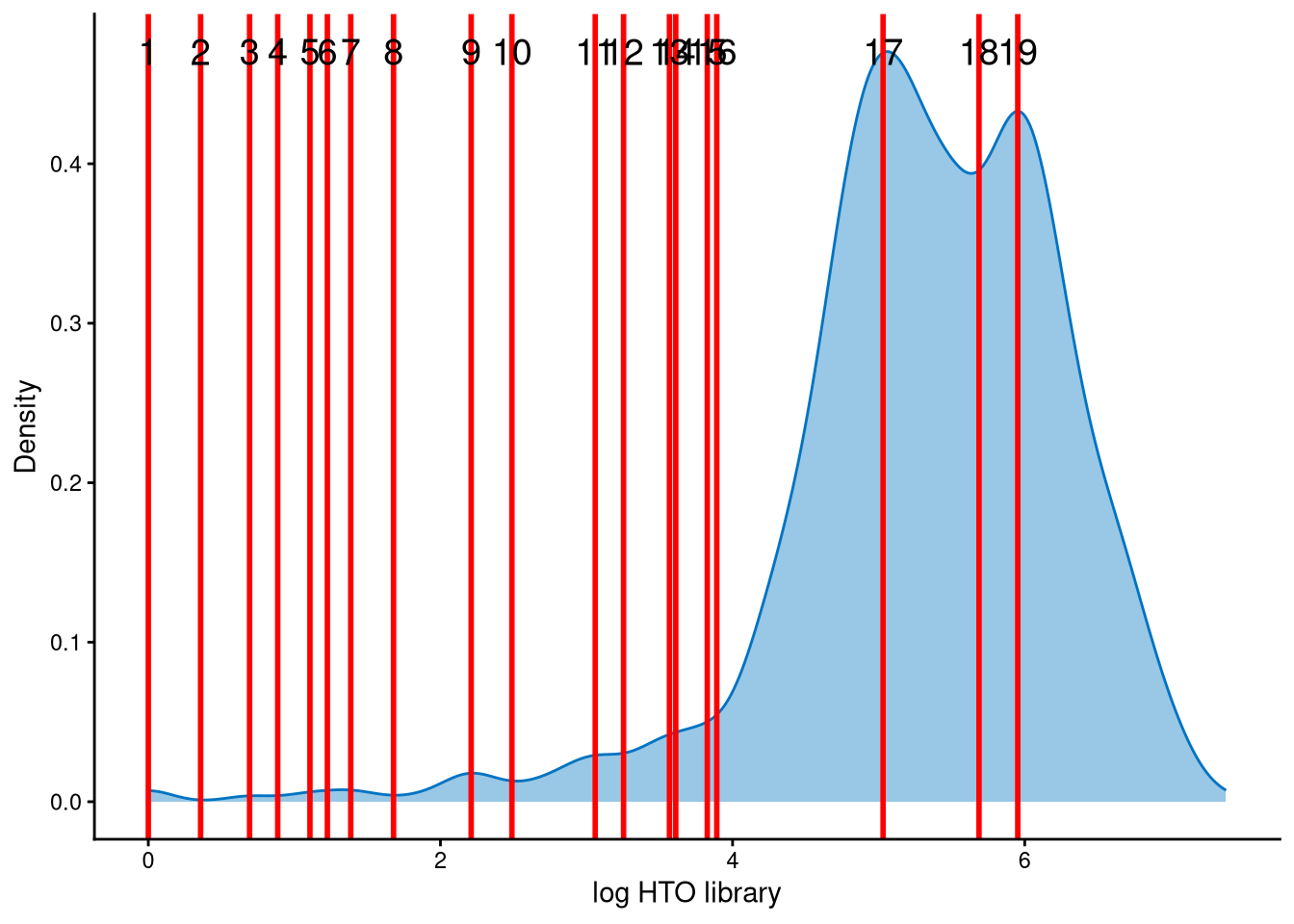
It is likely that the HTO library sizes for those outlier cells are bimodally distributed. Line no. 18 represents an appropriate cut-off at the anti-mode between the two peaks, allowing negatives and doublets to be distinguished from the outlier cells.
In the final step of demultiplexing, the Mahalanobis distance from CalculateMD, the original hashtag count matrix, the outlier classifications from AssignOutlierDrop, the gene expression data, and the selected HTO library size cut-off from the above plot are applied. Since optional clustering was applied to this dataset with extra clusters, optional is set to TRUE. K-medoids clustering from KmedCluster and the sample-label assignment from LabelClusterHTO are then applied to obtain the final demultiplexing results.
pdxcmo.cmddemux.assign <- CMDdemuxClass(pdxcmo.md.mat, pdxcmo.hash.count, pdxcmo.outlier.assign, use_gex_data = TRUE, gex.count = pdxcmo.gex.count, num_modes = 10, cut_no = 18, optional = TRUE, kmed.cl = pdxcmo.kmed.cl2, cluster.assign = pdxcmo.cluster.assign)
head(pdxcmo.cmddemux.assign)
## demux_id global_class demux_global_class doublet_class
## AAACCCAAGCCATTGT-1 CMO301 Negative Negative Negative
## AAACCCACAAAGGGTC-1 CMO301 Doublet Doublet CMO301_CMO304
## AAACCCACACCTTCGT-1 CMO301 Negative Negative Negative
## AAACCCACATCCGGTG-1 CMO302 Singlet CMO302 CMO302
## AAACCCAGTCCCAAAT-1 CMO302 Doublet Doublet CMO301_CMO302
## AAACCCAGTCGCGTTG-1 CMO304 Singlet CMO304 CMO304CMDdemux provides four types of outputs:
demux_id: the identity for each cell, determined by the sample with the minimum Mahalanobis distance for that cell.
global_class: classification of each cell as Singlet, Doublet, or Negative.
demux_global_class: singlet cells are labeled with their original sample, while negatives and doublets are labeled accordingly.
doublet_class: similar to demux_global_class, but doublets are labeled with their sample of origin. This is particularly useful for combined-hashtag experiments.
##
##   CMO301   CMO302   CMO303   CMO304  Doublet Negative
##     1134      928      174      445      396     1250
The output above shows the number of cells demultiplexed into each category.
9.8 Examination of suspicious droplets
In the original paper, compared with HTODemux, CMDdemux assigns more CMO301 and CMO302 singlets. We can use the functions CheckAssign2DPlot and CheckAssign3DPlot to visually assess whether the CMDdemux assignments are correct.
CheckAssign2DPlot consists of pairwise 2D plots of HTO library sizes, mRNA library sizes, the second Mahalanobis distance, and the ratio of the first to the second Mahalanobis distance. Negatives, singlets, and doublets are separated into different regions in these 2D plots.
CheckAssign3DPlot uses HTO library sizes, mRNA library sizes, and the ratio of the first to the second Mahalanobis distance to visualize negatives, singlets, and doublets in 3D.
First, apply HTODemux to the data.
pdxcmo.obj <- CreateSeuratObject(counts = pdxcmo.hash.count)
pdxcmo.obj[["HTO"]] <- CreateAssayObject(counts = pdxcmo.hash.count)
pdxcmo.obj <- NormalizeData(pdxcmo.obj, assay = "HTO", normalization.method = "CLR")
pdxcmo.obj <- HTODemux(pdxcmo.obj, assay = "HTO", positive.quantile = 0.95)
We then examine the cells that are assigned as CMO301 singlets by CMDdemux but classified as negatives by HTODemux. For this examination, 30 cells are randomly selected from this group.
pdxcmo.extra.cmo301 <- intersect(rownames(pdxcmo.cmddemux.assign)[which(pdxcmo.cmddemux.assign$demux_global_class == "CMO301")], names(pdxcmo.obj$HTO_classification.global)[which(pdxcmo.obj$HTO_classification.global == "Negative")])
set.seed(2026)
barcode.random.idx1 <- sample(1:length(pdxcmo.extra.cmo301), 30, replace = FALSE)
We then use CheckAssign2DPlot to visualize these cells in 2D.
CheckAssign2DPlot(pdxcmo.hash.count, pdxcmo.gex.count, pdxcmo.md.mat, cmddemux.assign = pdxcmo.cmddemux.assign, check_barcodes = pdxcmo.extra.cmo301[barcode.random.idx1], check_barcode_size = 3)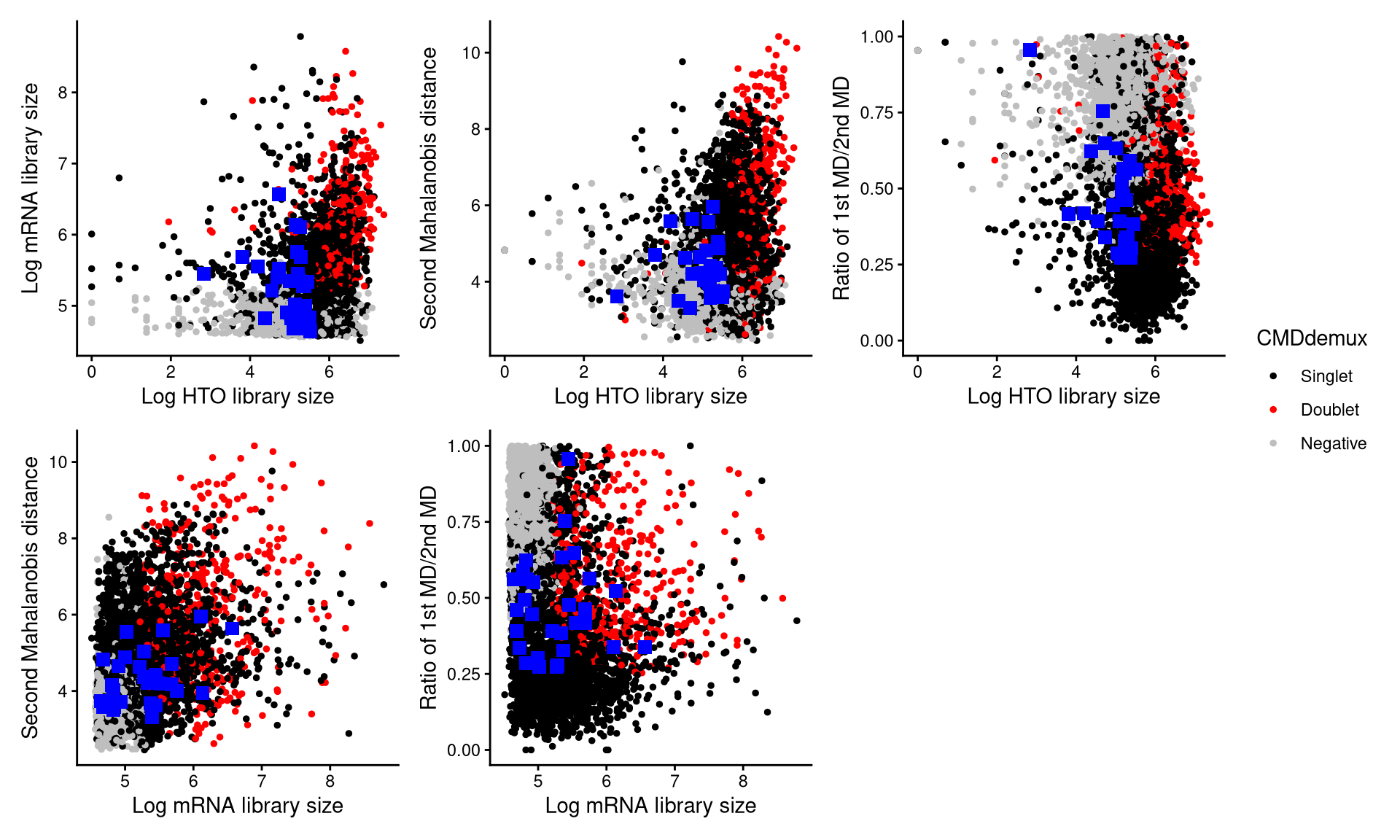
The blue squares represent the 30 randomly selected cells. From the plot, it is clear that most of these cells fall within the singlet region. Therefore, they should be demultiplexed as singlets.
Alternatively, we can visualize these cells using the 3D plot from CheckAssign3DPlot.
CheckAssign3DPlot(pdxcmo.hash.count, pdxcmo.gex.count, pdxcmo.md.mat, cmddemux.assign = pdxcmo.cmddemux.assign, check_barcodes = pdxcmo.extra.cmo301[barcode.random.idx1])The blue points in the 3D plot represent the 30 randomly selected cells. Most of them are located in the singlet region, while some lie in the area mixed with negatives. Therefore, most of these cells should be demultiplexed as singlets.
Next, we examine the cells that are demultiplexed as doublets by HTODemux but classified as CMO302 singlets by CMDdemux. Thirty cells are randomly selected from this group.
pdxcmo.extra.cmo302 <- intersect(rownames(pdxcmo.cmddemux.assign)[which(pdxcmo.cmddemux.assign$demux_global_class == "CMO302")], names(pdxcmo.obj$HTO_classification.global)[which(pdxcmo.obj$HTO_classification.global == "Doublet")])
set.seed(2026)
barcode.random.idx2 <- sample(1:length(pdxcmo.extra.cmo302), 30, replace = FALSE)
We then use CheckAssign2DPlot to visualize these cells in 2D.
CheckAssign2DPlot(pdxcmo.hash.count, pdxcmo.gex.count, pdxcmo.md.mat, cmddemux.assign = pdxcmo.cmddemux.assign, check_barcodes = pdxcmo.extra.cmo302[barcode.random.idx2], check_barcodes_col = "green", check_barcode_size = 3)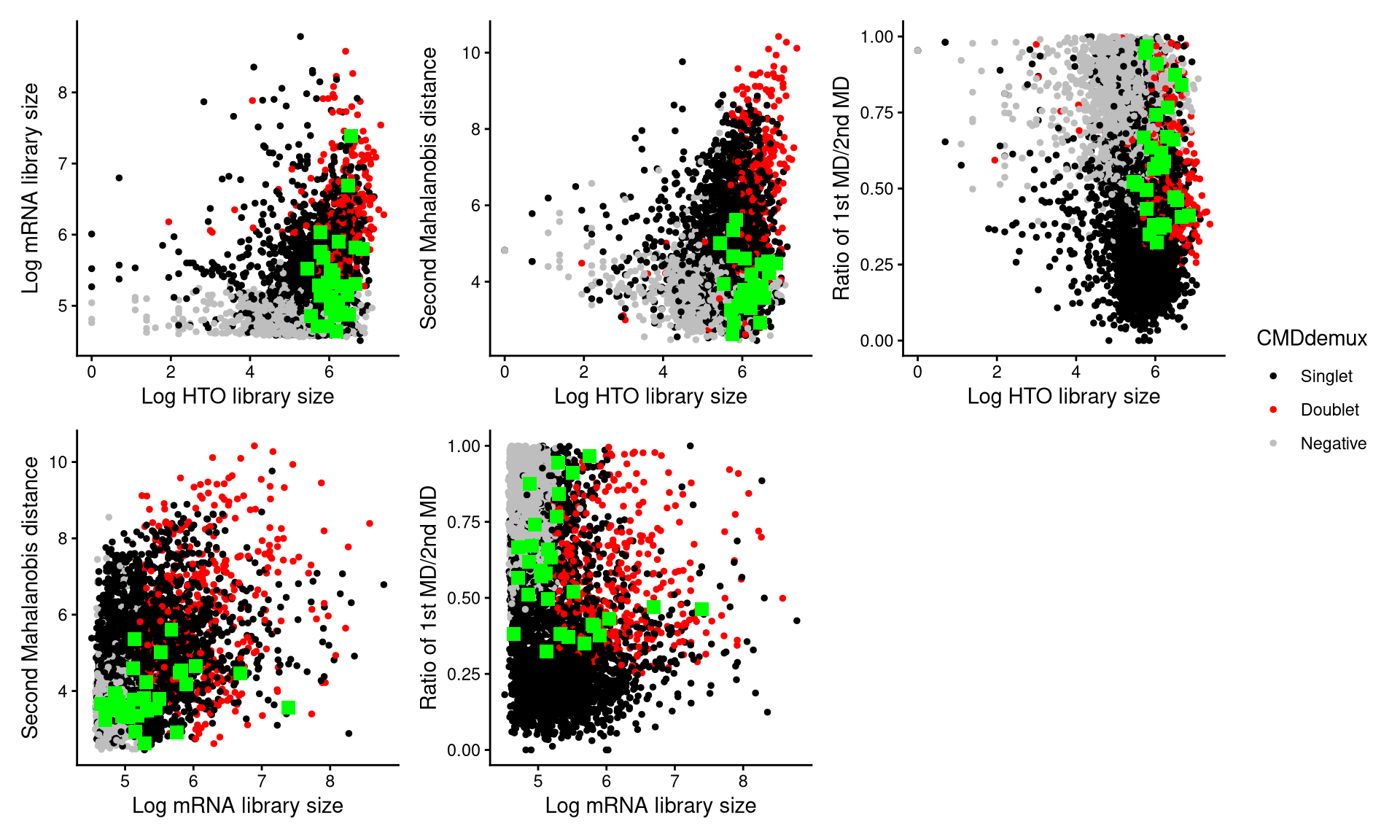
Those green squares in the plot represent the 30 randomly selected cells. Most of them are located in the singlet region, and they should be demultiplexed as singlets.
We then use CheckAssign3DPlot to inspect these cells in 3D.
CheckAssign3DPlot(pdxcmo.hash.count, pdxcmo.gex.count, pdxcmo.md.mat, cmddemux.assign = pdxcmo.cmddemux.assign, check_barcodes = pdxcmo.extra.cmo302[barcode.random.idx2], check_barcodes_col = "green")The green points in the 3D plot represent the 30 randomly selected cells. Most of them are located in the singlet region, and CMDdemux correctly demultiplexes them as singlets.